
One aspect of photography I find most tedious is image culling. It takes time, slows down the process and I also have to go through all the bad shots I’ve taken. Thankfully emerging and seasoned photo editing software are creating products that cull on your behalf – so I decided to test them and share the best photo culling software in 2026.
The scope of what a culling software can do differs depending on the software. Some are basic, simply removing duplicates or out of focus shots. Others give you more granular controls over what to omit and what to keep, then doing the culling work for you.
For me, I was looking for services that can considerably speed up my workflow so I could start editing sooner, and so I could deliver finished images to my clients faster.
To help you decide, I’ll share core features available on each software, how well they actually perform in real world testing and how much you can expect to pay. From every tool I tested, I’ve narrowed the options down to three. You can consider them the very best photo culling tools available.
How I Tested The Best Photo Culling Software
I test every software for a minimum of 30 days, giving myself the best opportunity to see how they fare in normal workflows. I use my top two options for my professional work, and have used them for much longer than my standard testing time frame.
The best way to see how good the tools were was to cull images manually and compare the final results and times taken to complete. I uploaded 589 RAW files from some recent portrait sessions and I conducted all software tests on my Macbook Air M5 laptop.
TL;DR: Imagen Is The Best Culling Software
Imagen is my top selection as its culling tools go deeper than other options. I like how I can select the number of culled images I want, and that I can add my editing profile prior to culling, meaning I have to do very little editing after the culling process. The process itself took half the time of doing it manually, and I could focus on other tasks as it ran in the background.
You can try it yourself for a full 14 days thanks to its free trial – sign up now.
Comparison: Best Photo Culling Software in 2026
| Software | Starting Price | AI Culling | AI Editing | Manual Controls | Accuracy | Culling Times (based on 589 RAW files) | Free Trial |
| Imagen AI | $1548/year | ⭐⭐⭐⭐⭐ | Yes | Yes | 90% | 5 mins | 14 days |
| Lightroom | $119.98/year | ⭐⭐⭐ | Manual Only | Yes | 65% | 4 mins | 7 days |
| Narrative | $120/year | ⭐⭐⭐ | Via presets | No | 79% | 3 mins | 30 days |
Imagen AI: The Best Photo Culling Software for Professionals
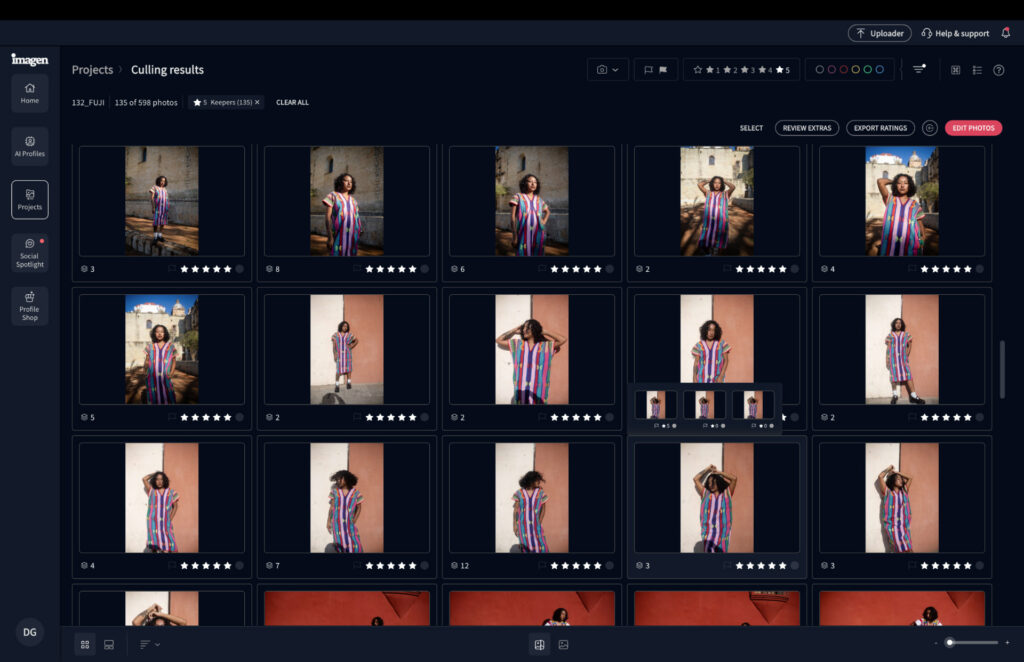
Imagen AI’s main selling point is that it speeds up workflows for professional photographers. Not simply a culling tool, the software also allows you to train and develop your personal AI photo editing assistant, meaning you no longer need to do the often tedious manual work, instead letting Imagen do the work for you.
The culling tools are still relatively new, but already pack more features than others. You can programme the software to cull to a specific number of images, or percentage of the overall number of RAW files you’ve added to the app. It’s possible to cull through star ratings – for example, five stars are your absolute keepers.
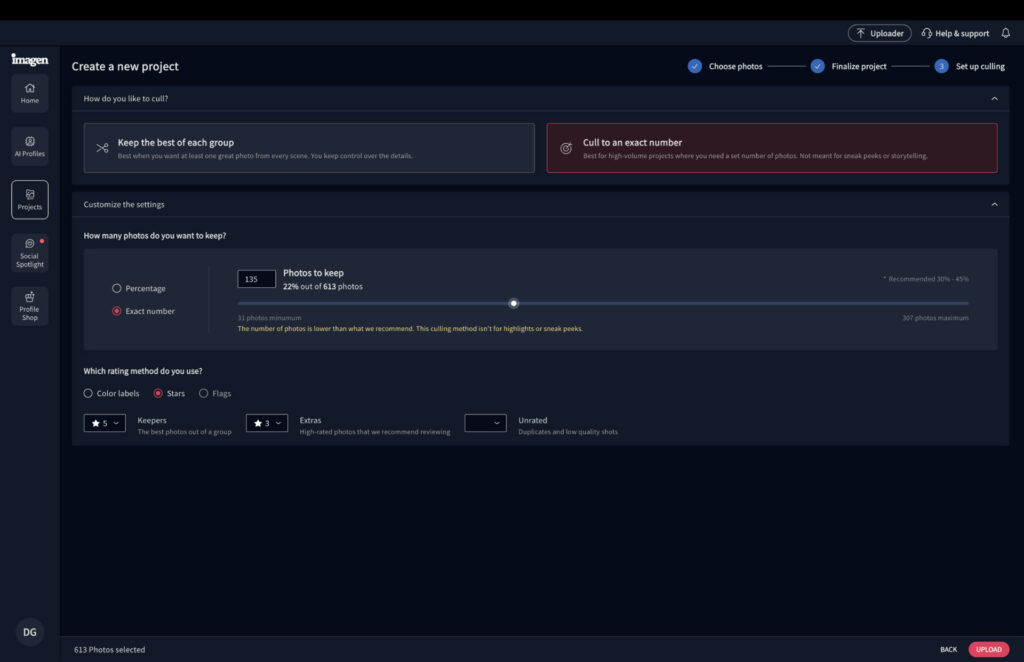
If you’re not fully satisfied with the results, you can make some manual tweaks. Imagen also culls images beyond your directed amount, filing them as images worth considering for your final batch.
The real perk comes in the form of editing. With your personalized AI profile, you can see what culled images will look like once edited. Imagen AI also takes care of that, drastically reducing the time spent in front of your computer.
Related: Best AI Photo Editor
Imagen AI: My Real-World Experience
During my testing, I found creating a culling project and defining the parameters to be a painless task. The process took around five minutes to complete, compared to the 15 minutes for me to cull manually.
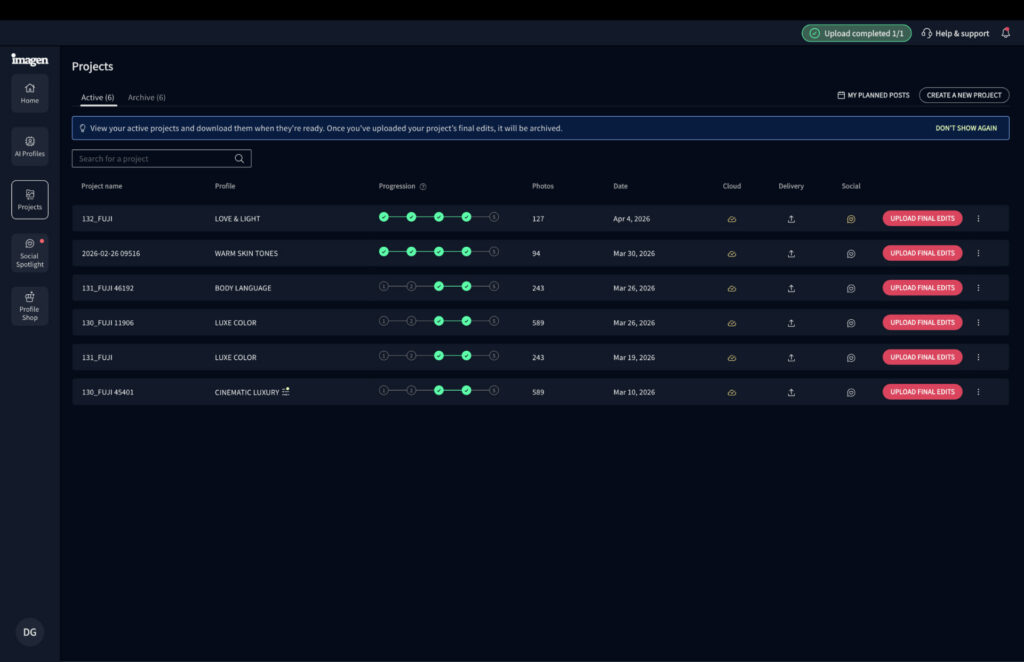
Imagen AI manages five-core steps to cull and edit your images.
In terms of the results, we were about 90% aligned on what I would define a must keep image. The main road blocks were in regards to creative judgements. Some images I thought worked on set were not to my liking after the fact, so they had to go. Imagen won’t know this, so it’s impossible to be fully aligned on the final outcome.
The images suggested beyond my requested 135 were actually decent. Out of the 31 photos Imagen asked me to reflect on, 10 of them made it into my final selection – having a second pair of “eyes” certainly showed its value here.
The best part is that after the culled images were finalized, it took only six extra minutes to edit them – that’s around 20 minutes from start to finish, which is incredible.
Before Imagen AI edited my file.

After

Related: I Tried Imagen AI for 90 Days: The Edits Shocked Me
How Much Does Imagen AI Cost?
Imagen’s Limitless plan comes with unlimited culling functionality. And you can edit an unlimited number of images too – making it perfect for large-batch photographers and photography agencies.
- Yearly: Limitless Use – $1548 ($129 per month)
Lightroom: Best Photo Culling Software for Portraiture
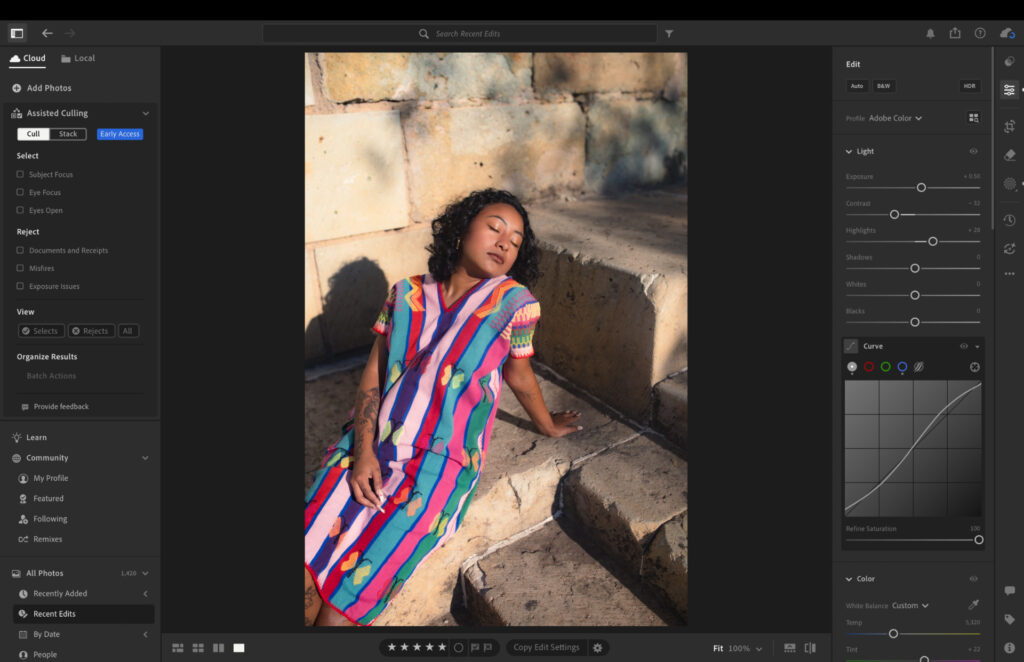
Lightroom’s assisted culling tools only became available towards the end of 2025, and the tools are still being fully developed.
What’s currently available mainly pertains to portrait photography. Users can ask Lightroom to remove images where eyes or a full subject are not in focus. You can put in a range between 0-100 to determine how soft or sharp shots need to be for Lightroom to include them in the final batch of images.
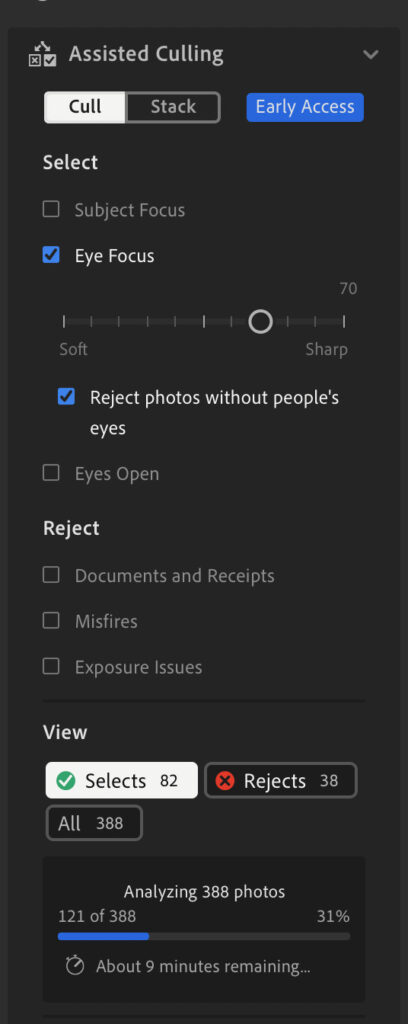
Lightroom can also remove misfires, for example, images with the lens cap still on or shots you’ve accidentally taken while pointing your camera toward the ground. There’s a toggle to remove bad exposures too, where images are dramatically over or under exposed.
The other remaining toggle is for closed eyes. Lightroom can completely remove portrait shots where the subject’s eyes are closed or partly closed. Personally, I exclude this as sometimes closing the subject’s eyes can be a creative choice.
Lightroom: My Real-World Experience
Because Lightroom’s culling tools are still pretty basic, using them doesn’t take much experience whatsoever – a beginner could take to them with ease.
I had no control over the number of images available in the final batch, which I certainly would like the option to have. With my instructions, Lightroom culled my images down to 265 from the initial 589. I was happy with the results, but the excess meant it was around 65% aligned with my personal culling.

All your keepers will have a green tick in the upper right-hand corner.
The actual process took four minutes for Lightroom to complete, which is great. Though I then needed to edit my images manually, which took a further couple of hours.
In my experience, Lightroom’s culling tools are best for removing the very worst of your images, serving as a good starting point for the rest of your culling session.
How Much Does Lightroom Cost?
Lightroom’s pricing is pretty good. The only downside is there’s no perpetual plan, pushing many photographers to seek a Lightroom alternative. If you know you’ll use it often, I recommend paying one year up front to enjoy the best value.
- Monthly 1TB Lightroom Subscription: $17.99
- Monthly 1TB Lightroom Subscription with 12-month commitment: $11.99
- Upfront Yearly 1TB Lightroom Subscription: $119.98
Related: Lightroom vs Lightroom Classic: My 2026 Real-World Verdict
Narrative: Best Photo Culling Software for File Management
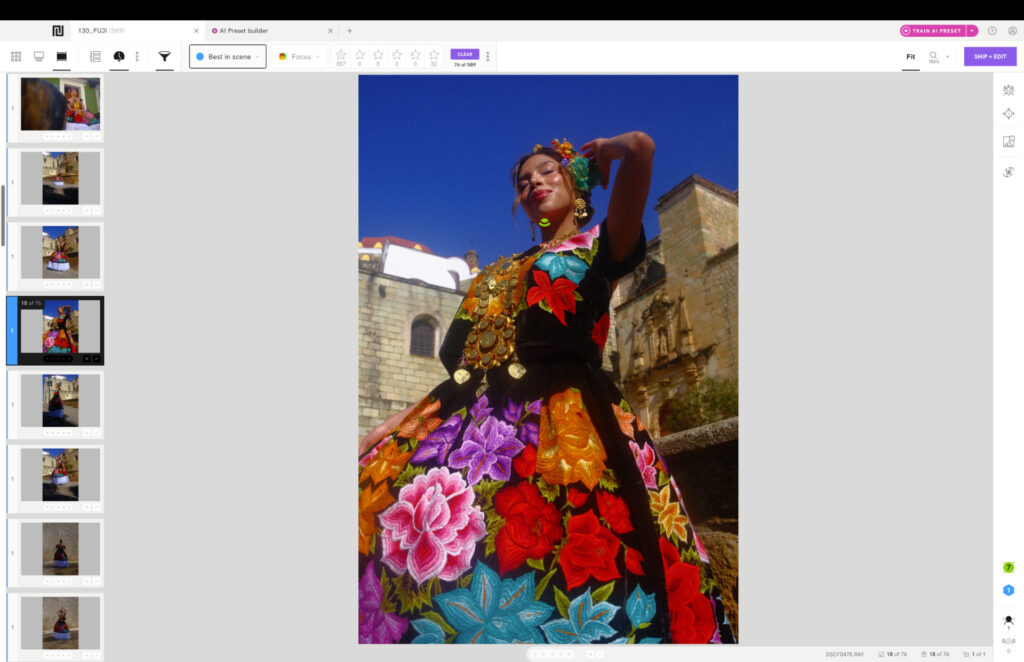
Narrative has only been around for a handful of years, but already has some decent culling tools to help you get started with editing. Rather than present only the best, Narrative sorts images into five different categories, ranging from undesirable, average and the best.
The software also presents an automated zoom version of your portrait shots, allowing you to quickly identify if an image is too soft for your standards and tastes. To help reduce time looking at similar images, Narrative will group similar scenes together, letting you know there’s not much variation in the batch of shots.
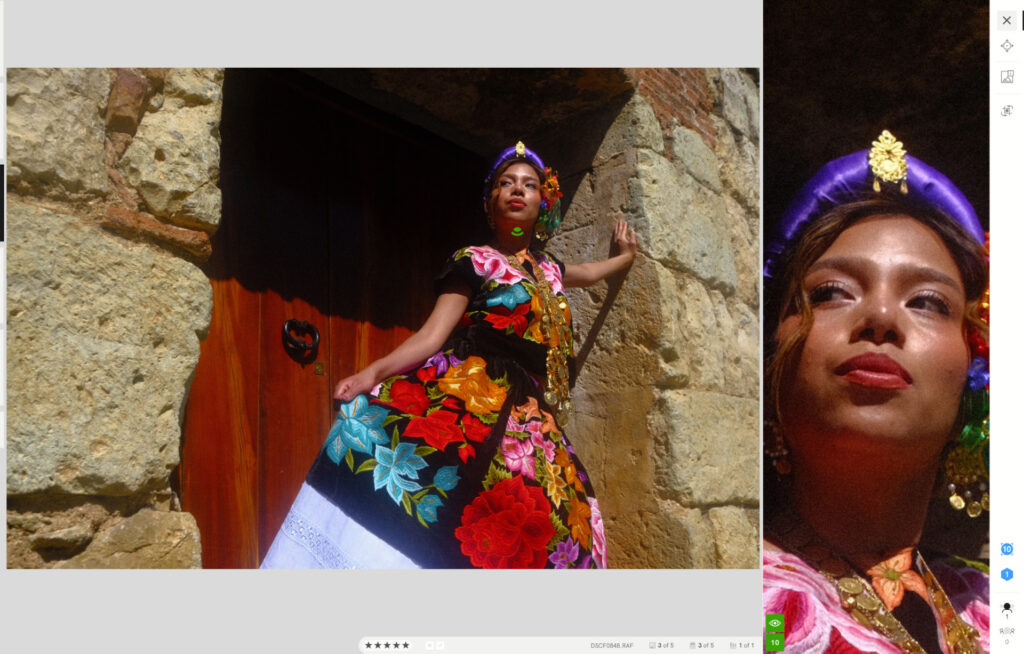
Any adjustments you want to make can be done via an AI preset, which you train on your previously edited work. Or you can connect to Lightroom and continue your editing session once your culling process is complete.
Narrative: My Real-World Experience
Narrative isn’t necessarily difficult to use, however, there’s a lot going on with the user interface which does take a little time to get accustomed to. The design is basic, which makes it functional, but it does seem a little dated compared to modern design standards.
Unlike Imagen, and to a certain degree Lightroom, Narrative doesn’t have many manual controls. Although missed, I wouldn’t say they were essential. Instead Narrative analyzed my images and sorted them into different categories, which took around three minutes to complete.
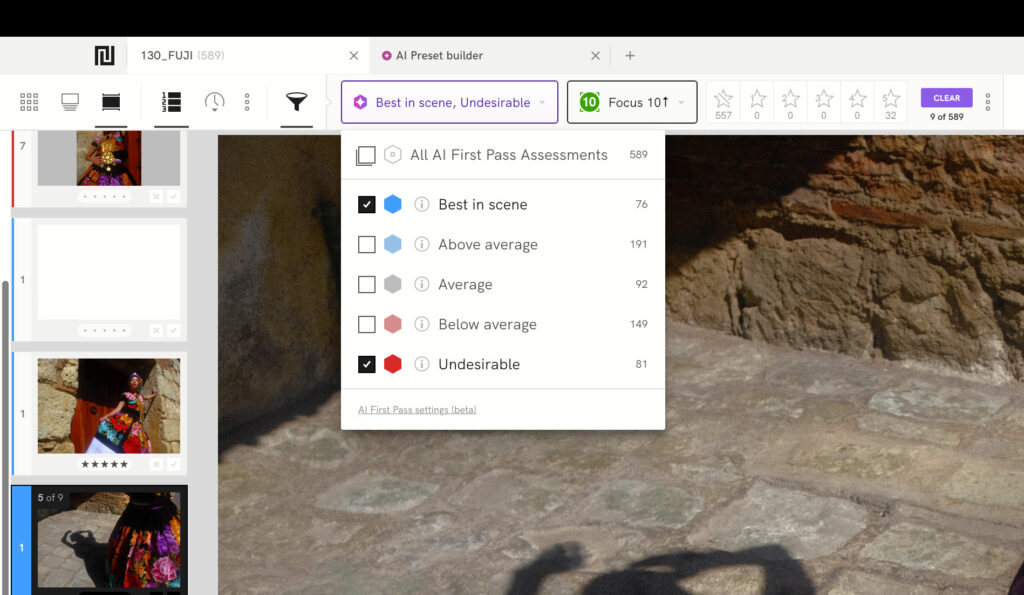
You can filter your images by their category.
Looking at the Undesirable category, I agreed with every image Narrative determined wasn’t up to par – though I wish it was even more ruthless with its selection. The top category – Best In Scene – produced 76 images. I agreed with around 60 of them, requiring me to remove a further 16 frames.
I do like that Narrative doesn’t bin any images, instead creating a file management system for your best to worst frames. This can certainly make the editing process much more efficient, though you need to do that either in an Adobe product or Capture One.
How Much Does Narrative Cost?
Narrative’s pricing scales well for photographers at any stage. All plans are billed annually and include unlimited images and projects. If you’re serious about AI-powered culling and editing, the Standard or Premium plans offer the best bang for your buck.
- Lite — $120/year: Fast AI culling for 1 user. Ships to Lightroom, Photoshop & Capture One.
- Standard — $240/year: Advanced AI culling + unlimited AI editing with Core & Marketplace Presets, for 1 user.
- Premium — $480/year (Best Value): Everything in Standard, plus 1 Personal AI Preset, AI image straightening, for up to 2 users.
- Ultra — $720/year: Everything in Premium, plus up to 5 Personal AI Presets, dedicated onboarding, and early feature access, for up to 4 users.
How Good Are Photo Culling Software in 2026?
Something to consider is that automated photo culling is very much in its infancy, with most software having tools that are still in BETA. After all my testing, we’re certainly not at a stage where a platform can do everything for you, without any of your input. If that’s what you expect, then you will be sorely disappointed.
As things stand, I advise viewing such tools as a way to speed up the process. Software like Imagen also serves as a second pair of eyes, giving you the opportunity to reflect on your initial culling decisions, and save images you may otherwise have deleted.
I do think the starting point of this type of feature is strong, and no doubt will get better. If it gets to a point where you can train the software to fully understand how you determine between a keeper and poor shot, then the possibilities will seem limitless.
Signing Off
All three tools have their merits, and any one of them will bring some efficiency to your editing sessions. Lightroom is a decent starting point if you’re already in the Adobe ecosystem, and Narrative does a solid job of organizing your images into a workable file structure. But if you’re looking for the tool that genuinely moves the needle on your workflow, the gap between Imagen and the rest is hard to ignore.
Imagen is the clear choice for photographers who take their time seriously. The depth of its culling controls, the accuracy of its selections and the ability to edit right off the back of the culling process sets it apart from anything else currently available. From uploading your RAW files to delivering edited images, the time savings are significant.
More reading: The Best Photo Editing Software for Beginners in 2026
Read our Affiliate Statement.